We built AutoPost for creators, small business owners, institutional PR teams, and community managers who have to keep many people informed in many places every day. The goal is simple: you write once, and AutoPost takes care of the rest — adding branding to the images you compose, sending on time, retrying when something fails, and reporting the results.
AutoPost is currently in its trial period and free. The platforms already active are Telegram, X (with a monthly post quota), and Facebook Page, Instagram, and Threads (through your own Meta app). Pinterest and TikTok are awaiting approval from those platforms. The table below summarizes their status, and each feature is then explained in more detail.
Feature status summary
| Feature | Status | Notes |
|---|---|---|
| Send & schedule to Telegram (channels and groups) | Available | Through your own bot |
| Send & schedule to X | Available | Monthly post quota · X API costs covered by AutoPost |
| Send & schedule to Facebook Page, Instagram, and Threads | Available | Through your own Meta app · illustrated guide included |
| One post to many accounts at once | Available | Up to 3 accounts per platform |
| Carousels: several photos or videos in one post | Available | Telegram, Facebook Page (photos), Instagram, Threads · up to 10 |
| Automatic retries & per-account reports | Available | Delays of 1 → 5 → 30 minutes |
| Automatic branding on images | Available | Post composer & auto post images |
| Branding on auto post images | Available | Same settings as the Branding page |
| News trends & holidays | Available | Including Indonesia |
| Calendar, analytics, notifications | Available | Sent & failed · plus device notifications |
| Color themes, including dark mode | Available | More than 20 themes |
| AI auto post & from a website/RSS | Available (beta) | Beta · your AI key |
| Automatic stock photos in auto post | Available | From Pixabay, with credits |
| Auto video & Shorts Maker | Available | Made on your device · your AI key |
| AI keys from many providers | Available | Gemini, OpenRouter, Groq, OpenAI, Claude, DeepSeek, … |
| Delete your account & data at any time | Available | Instantly, no need to contact us |
| Awaiting approval | API access awaiting Pinterest's approval | |
| TikTok | Awaiting approval | Can be connected; posts stay private until TikTok approves |
| Android app on Google Play | Coming soon | The web version can be installed to your home screen |
Available now
Send and schedule to Telegram
Connect a Telegram channel or group through a bot you create yourself, then send a post right away or pick the date and time it goes out. Sending runs on the server, so your device doesn't need to be on when the scheduled time arrives. The bot token is tested with Telegram before it is saved. The full steps are in the Telegram auto post guide.
Facebook Page, Instagram, and Threads
All three are connected through your own Meta app (this requires a Meta for Developers account): Facebook Page uses a System User token, while Instagram (Business or Creator accounts) and Threads use the official sign-in with your app ID. Because the app is yours and is used for your own accounts, Meta doesn't require App Review. Text, photos, videos, and carousels have been proven to reach all three.
- Setting up a Meta app takes a few steps. The illustrated guide, which can also be downloaded as a PDF, is on each platform's account page inside the app.
- Threads accepts text up to 500 characters; polls and replies aren't supported yet.
One post to many accounts at once
Choose several target accounts in a single post. No more copying and pasting into every channel. Each user can connect up to three accounts per platform — this limit is enforced directly in the database, not just in the interface.
Carousels: several photos or videos in one post
Pick up to 10 photos or videos in the post composer, then send them as a single post: an album on Telegram, several photos at once on a Facebook Page (photos only), and a carousel on Instagram and Threads (photos and videos can be mixed). On X, Pinterest, and TikTok, a post still carries a single media item.
Automatic retries and per-account reports
If a send fails because of a temporary problem, AutoPost tries again after 1, 5, then 30 minutes. Each account's result is recorded separately, so you know exactly which channels succeeded and which need checking, along with the reason.
Automatic branding on images
Set it up once on the Branding page: the account name at the top and a “follow & share” call-to-action bar at the bottom of the image. When you add a photo in the post composer, that branding is applied automatically and the preview matches the final result. Aspect ratios of 1:1, 4:5, 16:9, and 9:16 are available, plus a design card with a title if you don't have a photo. For posts you compose yourself, the image is put together on your own device.
Images for AI auto posts and auto posts from a website get the same branding too — drawn on our server at the ratio closest to the shape of the original image. You can turn this off on the Branding page. If a source image can't be processed, it is sent as is so the post still gets published.
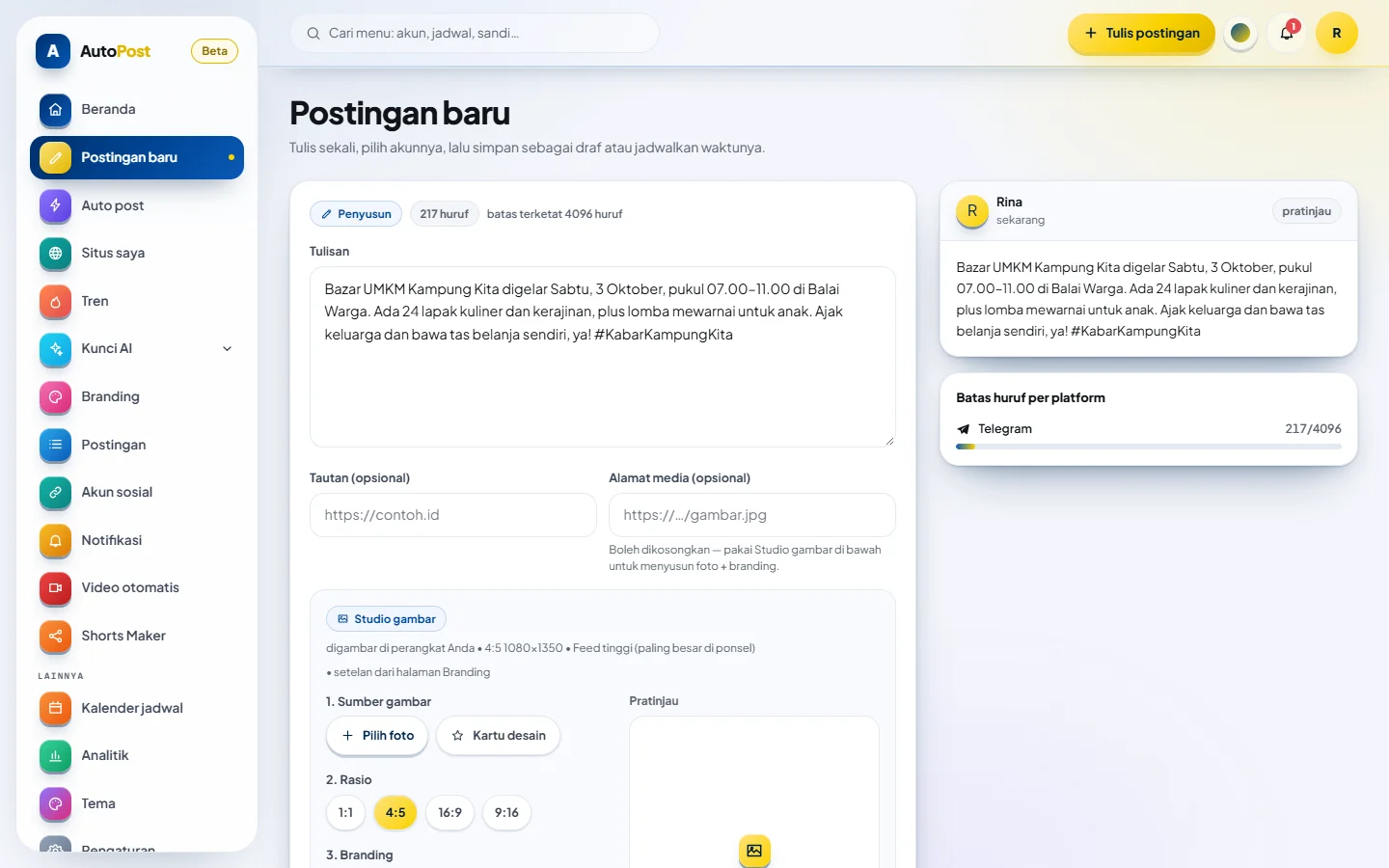
Post composer: one post, choose the target accounts, then save, send, or schedule.
News trends and holidays
Out of ideas? The Trends page shows today's top news from eleven countries — with Indonesia selected first — along with upcoming national and international holidays. Any idea can be turned straight into a post or an AI auto post.
Calendar, analytics, and notifications
The calendar shows all your scheduled posts in one view. Analytics summarizes how many posts were sent and how many failed. In-app notifications let you know when a send's result is final — all sent, partially sent, or failed — and you can adjust them to suit your needs. When a post fails, AutoPost can also send a notification to your phone or computer through the browser, even when the app isn't open.
Color themes and dark mode
More than 20 color themes, including several dark themes that are comfortable to use at night. The look changes instantly as soon as you pick one.
AI auto post and from a website/RSS (beta)
Set a topic and a daily schedule, and AI composes posts using your own AI key — a Gemini key with its free allowance is enough for light use, and keys from OpenRouter, Groq, OpenAI, Claude, DeepSeek, and other providers work too. It can also share new articles from your blog or RSS feed automatically. The image can be a free stock photo from Pixabay that matches the post, complete with a title, branding, and photographer credit; if nothing fits, a design card is used. With a paid key, the estimate is about Rp10 per post. More on the AI auto post page.
Auto video and Shorts Maker
Auto video makes a short 15–30 second video from a single idea: AI writes a script scene by scene, a voice-over is added, and each scene gets a stock photo, your own photo, or a design card. Shorts Maker cuts a long recording of yours into up to three shorts: the speech is transcribed, AI helps pick the best parts, long pauses are removed, and subtitles are burned into the video. Both are rendered on your own device (in the browser, not on a server), use your own AI key, and the result can go straight into a New post.
Delete your account and data at any time
From Settings, you can delete your account yourself without having to contact us. Posts, schedules, uploads, social account connections, and stored keys are all deleted instantly along with it. Read how account deletion works.
X (Twitter), with a monthly quota
X accounts are connected through the official X API using AutoPost's own X app: you just sign in to X and approve the permissions — no need to create an app or keys, or to pay for API credits yourself. X API costs are covered by AutoPost, which is why every user gets a monthly X post quota, and posts containing a link (in the text or in the Link field) are limited more strictly because they cost much more. Your remaining quota is shown on the X account page; the quota resets on the 1st of each month.
- Each post is sent to only one X account — X prohibits posting the same text to multiple accounts.
- Text can be at most 280 characters as X counts them (each link counts as 23; emoji and non-Latin characters count as 2), with one photo, GIF, or video. Text that is too long is held back, not silently cut off.
- X is excluded from auto post and from posts created from a link, so your quota isn't used up without you noticing.
- Replies, threads, polls, quote posts, and X analytics aren't supported yet.
We never use your X cookies or your signed-in X session. If the quota or that month's API budget runs out, X posts are held and reported as failed, not sent some other way.
Awaiting approval and coming soon
We'd rather say plainly what isn't available yet than promise dates that aren't certain. Here is what is awaiting platform approval or still being prepared:
- Pinterest. The official connector is already built, but AutoPost's public API access is still awaiting approval from Pinterest.
- TikTok. TikTok accounts can already be connected through TikTok's official API for videos and photos, but the AutoPost app is still awaiting approval (production review) from TikTok. Until it is approved, TikTok only allows posts that are visible to the account owner alone: the TikTok account must be set to Private, and at most 5 users per day can post. Each TikTok post is composed individually in the post composer, complete with your privacy choice and consent, so TikTok is excluded from auto post and from posts created from a link.
- Android app. The app is already built and is being prepared for Google Play. In the meantime, the web version already works well on phones and can be installed to your home screen from the browser menu.
Security and privacy
Platform tokens and AI keys are encrypted with AES-256-GCM on the server and are never sent to the browser. We don't sell data and we don't run ads. Your rights to access, correct, and delete personal data follow Indonesia's Personal Data Protection Law (Law No. 27 of 2022). Details are in our privacy policy.
Pricing
Free during the trial period, with no credit card and no automatic billing. No paid plans are being sold at this time. If a paid plan is offered later, we'll announce it in advance, and we won't quietly change the free features.